Project Zomboid Helicopter Event: AEBS Warning and Safe Survival (B42.19)
Build 42.19 · timed flyover · zombies migrate to the noise · the chopper does not shoot players
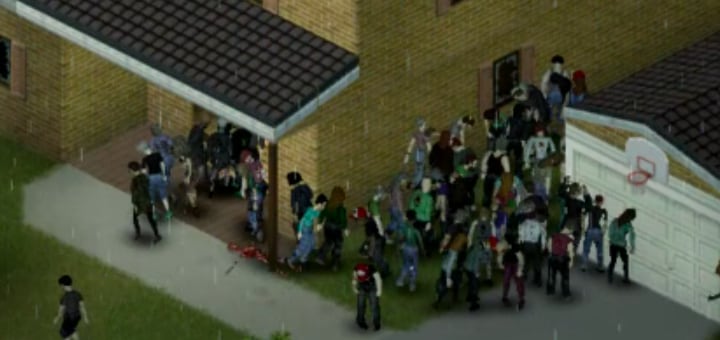
The helicopter event is a timed flyover that uses loud engine sound to pull zombies toward its path—and toward any player it manages to track. On default Apocalypse settings it fires once in the early game (commonly around days 6–9, often during daytime hours such as mid-morning through evening). It is dangerous because of the crowd it moves, not because the aircraft fires on you.
What the helicopter actually does
During a pass the chopper moves through phases such as Arriving, Hovering, Searching, and Leaving. While active it makes enough noise to migrate zombies. If it has a visible living target it can track that position; if it loses sight for about 15 seconds it returns to searching. Tracking is limited (on the order of about 60 seconds of “bother” time), with hover/search radii on the order of 50 / 100 tiles—not infinite pursuit.
- Does not shoot players or buildings. The threat is zombie density and pathing.
- Visibility matters. Being outdoors or in open line of sight is how you get marked as a target.
- Sound matters. The aircraft already makes a lot of noise; your guns, engines, and smashing add more draw on top.
How to know it is today: AEBS
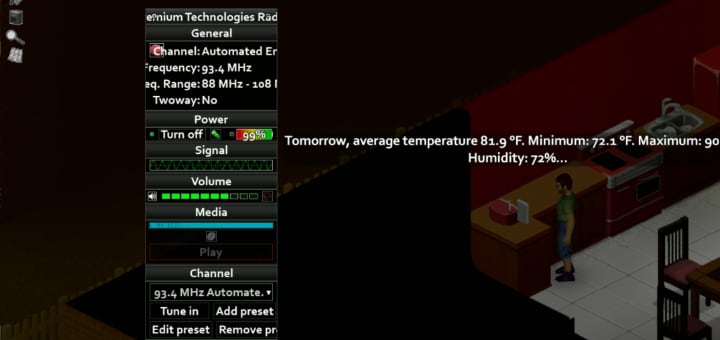
The Automated Emergency Broadcast System (AEBS) airs on the hour and, on the scheduled helicopter day, includes the line “Air Activity detected.” That warning is your cue that the flyover is scheduled for today.
- Find any working radio (portable or house radio) and power it on with a battery or house power.
- Open the channel list and look for Automated Emergency Broadcast System. The name may appear as you scan; the frequency is not fixed.
- Each new game randomizes AEBS in the 88.000–108.000 MHz FM band. Write the frequency down once you find it so every radio can match it.
- Listen near the top of each hour. On helicopter day you should hear the air-activity line mixed into the usual AEBS content.
Choose a plan by status
The right move depends on whether the helicopter has already locked onto you—not on how many floors or windows a building has.
A. Not spotted (preferred)
- Stay inside before and during the pass.
- Close curtains and avoid standing in open windows or on roofs.
- Keep noise low: no unnecessary combat, no generators you can avoid, no outdoor engines.
- Sit on prepared food and water; wait out Arriving → Searching/Hovering → Leaving.
- Only fight zombies that are already breaking into your room—do not go outside to “thin the herd.”
B. Already tracked
- Assume zombies will keep pathing toward your last known area while the event is hot.
- If you have a reliable vehicle, fuel, clear roads, and a route that does not drag the crowd through your long-term base, driving away can break the local pile-up.
- If the car is questionable, the road is clogged, or you would lead the migration past your only safehouse, stay put in the deepest interior room instead.
- Foot travel is a last resort: you are slow, exposed, and easy to re-spot.
When driving out actually helps
Leaving town is optional and only sensible when all of the following are true:
- Vehicle starts reliably and has enough fuel for the whole detour.
- You already know a road out that is not a dead-end parking lot.
- You can aim for a secondary stop away from your main base so the migrating pack does not learn your home address.
- You accept crash risk: a wreck mid-event drops you next to a moving horde.
If any of those fail, indoor quiet waiting is usually safer than improvising an evacuation.
Sandbox frequency (Never / Once / Sometimes / Often)
Custom Sandbox and presets expose a Helicopter option that controls how often a pass happens over the event zone. In-game description: “How regularly a helicopter passes over the Event Zone.” Changing this only affects schedule frequency—it does not make the aircraft armed.
| Setting | Typical use |
|---|---|
| Never | Learning runs, calmer early game, or Rising-style defaults (Rising starts with Never). |
| Once | Default Apocalypse / Outbreak style: one early major stress test. |
| Sometimes | Repeated pressure after the first week (e.g. Extinction defaults higher frequency). |
| Often | High-chaos challenge worlds; plan permanent radio discipline and secondary safe rooms. |
Quick checklist
- Radio found, AEBS frequency written down, hourly habit established by day 5.
- Safe room with closed curtains, food, and water for a full day of waiting.
- Go / no-go decision for the vehicle written before the warning day (fuel, spare, route).
- On “Air Activity detected”: execute plan A (hide) unless you are already tracked and plan B is fully ready.
- After Leaving: clear only what is required to secure doors; do not celebrate with fireworks or gunfire.
Related guides
Related Articles