How to Style Hair & Beard in Project Zomboid (Build 42.19)
Build 42.19 · Hair, beard, dye, and makeup are cosmetic only — no combat bonuses.
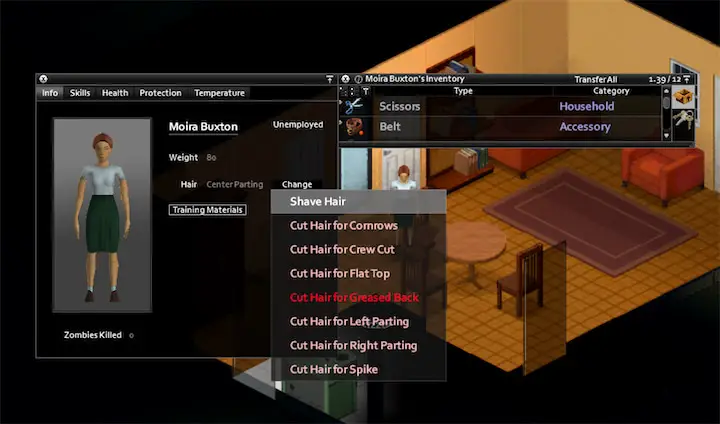
C) → find Hair / Beard → press Change. Which options appear depends on the tools in your inventory; there is no single “right-click scissors to restyle everything” action.
1. Change hairstyle in Character Info
- Carry the tools the target style needs (see table below).
- Open Character Info with
C(or your bound key). - On the hair row, click Change. Male characters also get a Beard row with its own Change button.
- Pick a shorter length, a listed trim choice, shave, or tie/untie when those options appear.
You can only move to a style at a lower length level than your current hair, or to a style listed in that hair’s special trim choices. You cannot cut longer styles into existence—wait for growth, then restyle.
Attached styles (ponytails and similar) can be tied or untied from the same menu when the game shows those options.
2. Tools by target style
Most cuts need scissors (including blunt scissors and other scissors-type tools). Special styles need gel or spray. Shaving bald accepts a razor or scissors.
| Goal | Required tool(s) | Notes (Build 42.19) |
|---|---|---|
| Normal cut / shorter length | Scissors (or another scissors-type tool) | Default path for almost every non-special style. |
| Shave hair to Bald | Razor or Scissors | Menu label becomes “Shave Hair”. |
| Mohawk styles (except Mohawk Flat) and Spike styles | Hair Gel or Hair Spray | Any Mohawk option other than Mohawk Flat, plus Spike-style names. |
| Greased Back | Hair Gel only | Spray alone is not enough. |
| Buffont | Hair Spray only | Gel alone is not enough. |
| Trim / shave beard styles | Razor or Scissors | Every beard option on the Change menu uses this pair. |
3. Hair and beard growth
| Feature | Threshold | Approx. game days |
|---|---|---|
| Hair length step | 480 survival hours | ~20 days |
| Beard length step | 120 survival hours | ~5 days |
- Growth advances along style length levels (short → medium → long), not by free custom shapes.
- With normal sleep rules enabled, the length change is applied when you sleep after the timer is ready—so sparse sleep schedules make growth feel slower.
- If multiplayer or sandbox turns off Sleep Needed, the same hour thresholds can still advance while awake once reached.
- Cutting or shaving resets you to the new style’s level; you must grow again for longer options.
4. Hair dye (and beard dye)
Bottles are fluid containers named Bottle of Hair Dye. Build 42 ships three random-fluid tiers:
| Dye bottle tier | Colors in the bottle pool | Capacity | Per use |
|---|---|---|---|
| Common | 8 colors | 1.0 | 0.5 (2 full uses) |
| Uncommon | 9 colors | 1.0 | 0.5 |
| Rare | 13 colors | 1.0 | 0.5 |
Total: 30 distinct dye colors across the three tiers. Exact shade is randomized from that bottle’s fluid list—check the bottle color in inventory rather than memorizing fixed names.
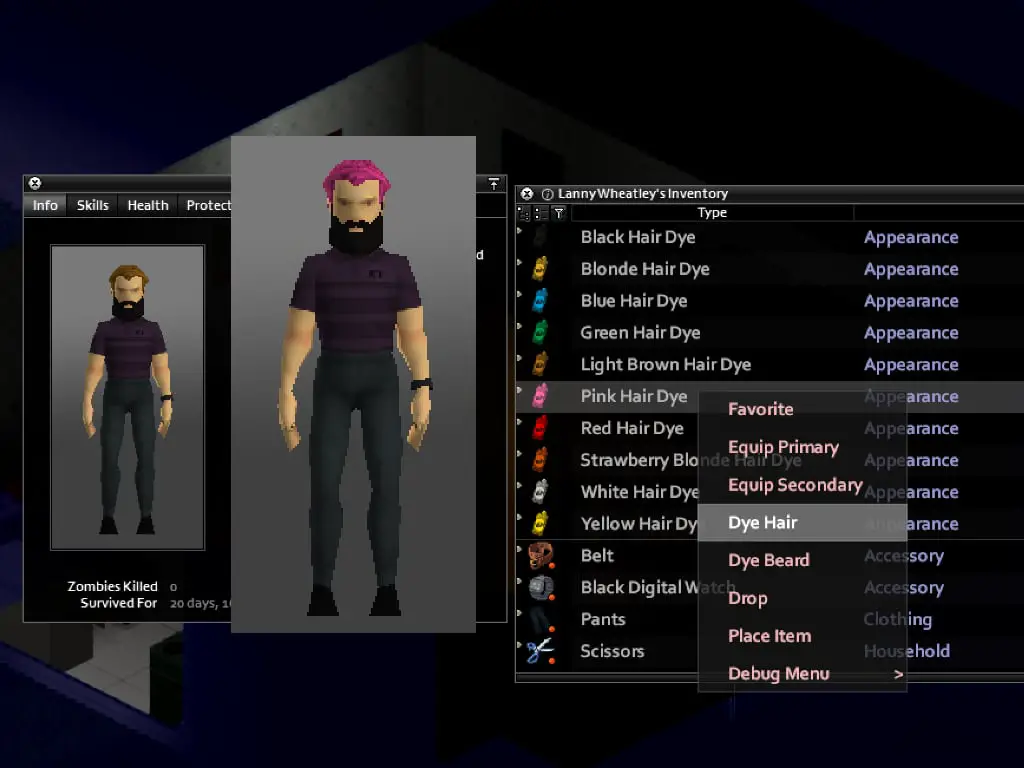
- Right-click a dye bottle in inventory.
- Choose Dye Hair and/or Dye Beard (beard option only when you have a beard model).
- Each successful action subtracts 0.5 from the bottle’s 1.0 capacity and sets the hair or beard color to that fluid’s color.
Dye is permanent cosmetic color on that hair/beard model. Cutting does not wash it out; washing clothes or swimming does not strip it either.
5. Makeup
Three drainable cosmetics apply face options only (no gameplay stats):
- Lipstick — lips
- Eye Makeup — eyes
- Foundation Makeup — foundation / under-eye looks
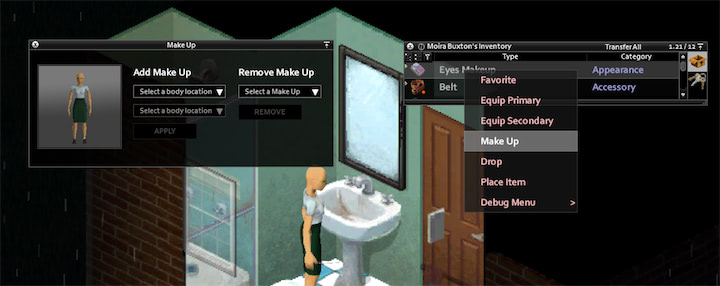
Right-click the cosmetic and open the makeup menu. You need a valid mirror condition — any one of:
- A wall or furniture mirror nearby
- A portable Mirror item in inventory
- Sitting in a vehicle
- Having foundation available in inventory (foundation itself can satisfy the mirror check for makeup access)
The same menu can clear applied makeup. Nothing here grants stealth, combat, or moodle bonuses.
6. Vanilla style preview gallery
Local previews of common vanilla looks. In-game lists differ slightly by sex, length level, and trim choices; use Character Info for the live menu.
Hair
 Bald
Bald Buzz Cut
 Crew Cut
 Flat Top
 Ducktail
 Spikes
 Greased Back
 Buffont
 Mohawk Flat
 Mohawk Short
 Mohawk Spike
 Mohawk Fan
 Center Parting
 Left Parting
 Right Parting
 Long Center Parting
 Bob
Bob.jpg) Bob (Curly)
Bob (Curly) Bun
Bun.jpg) Bun (Curly)
Bun (Curly) Lob
Lob.jpg) Lob (Curly)
Lob (Curly) Over Right Eye
.jpg) Over Right Eye (Curly)
Over Right Eye (Curly) Over Left Eye
 Raquel
 Raquel (Curly)
 Top Curls
 Cornrows
 Braids
 Long Braids
 Longer Braids
 Ponytail
 Ponytail Braids
 Pulled Back
 Mullet
.jpg) Mullet (Curly)
Mullet (Curly) Grungey
 Grungey Long
 Grungey Parted
 Grungey Behind Ears
.jpg) Short (Curly)
Short (Curly) Long
Long.jpg) Long (Curly)
Long (Curly)Beards
 Chops
Chops Moustache
 Goatee
 Chin
Chin Pointy Chin
 Chinstrap-style
 Full
Full Long
Long Long Scruffy
7. Optional Workshop hair mods
Vanilla already covers length levels, trim choices, dye, and makeup. Extra style packs are optional. Before installing on a Build 42.19 server, open each Workshop page and confirm it still lists Build 42 support.
| Mod | Workshop ID | Build support | Role |
|---|---|---|---|
| Fluffy Hair [B41 & B42ish] | 2447729538 | Build 41, Build 42 | Adjusted default hair models (often required by other hair packs). |
| Spongie's Hair | 2463184726 | Build 41, Build 42 | Large extra hairstyle set; check current dependencies on its Workshop page. |
| Improved Hair Menu Build 42 | 3589548354 | Build 42 | 3D preview menu for creation and in-game Character Info hair/beard picks. |
| Improved Hair Menu (legacy) | 2732662310 | Build 41 only | Original B41 UI mod—do not use as a B42 solution. |
| Harry's Hair | 2456540487 | Build 41 | Older style pack; no Build 42 listing at last check—verify before use. |
8. Practical checklist
- Loot scissors early for emergency shaves and tidy cuts; add a razor for beards and bald shaves.
- Keep Hair Gel for Greased Back / Mohawk-Spike work and Hair Spray for Buffont.
- Plan long styles around the ~20-day hair step; beards step about every ~5 days.
- Each dye bottle is two full applications (1.0 capacity, 0.5 per use) for hair or beard.
- Carry a Mirror if you want makeup away from bathroom tiles or vehicles.
Related Articles