How to Find and Use a Car Key in Project Zomboid
Build 42.19 · Vanilla
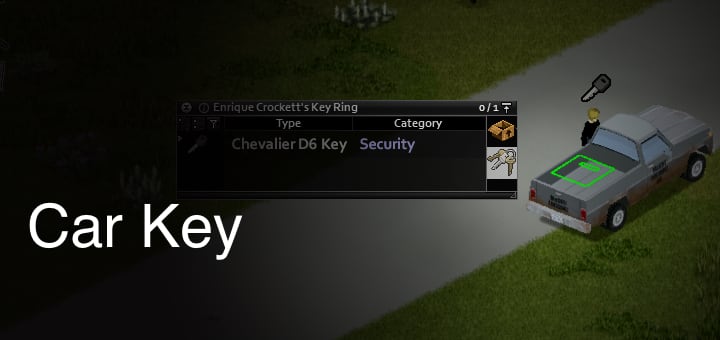
 Car Key
 Key icon
What a Car Key is
- Display name: Car Key
- Weight: 0.05 · Security item
- Matching rule: only the key that belongs to this vehicle will start it. A random house key or another car’s key will not work.
- Not the same as door keys: building and padlock keys are separate items. They are not interchangeable “universal car keys.”
Where to look for the key (reliable order)
When a vehicle has a key, it is almost always on or next to that car — glove box, nearby ground, nearby zombie, or already in the ignition. Search the car and its immediate surroundings first, not random house storage across the block.
| Priority | Location | What to do |
|---|---|---|
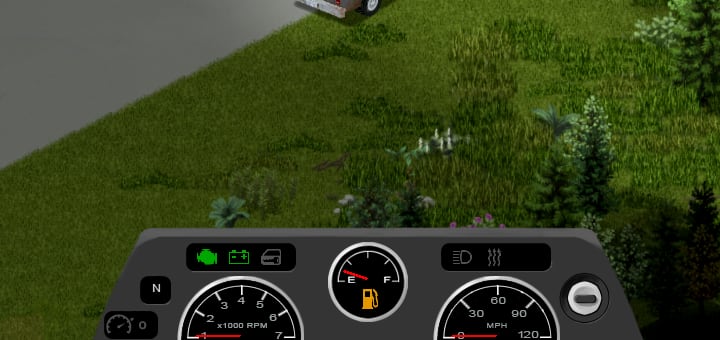
| 1 | Already in the ignition | Enter the driver’s seat. If keys are in the ignition, you can start without holding a key item in inventory. The dashboard ignition icon reflects this state. |
| 2 | Glove box | Open the vehicle container seats / glove box from the vehicle UI and loot Car Key. This is one of the main places keys show up. |
| 3 | Ground near the vehicle | Check parking-lot tiles and the squares around the car for a dropped key. Clear zombies first so you can see the ground. |
| 4 | Nearby zombie corpses | Loot zombies close to the car. A matching car key can end up on a nearby zombie. |
| — | Random house storage (not a primary source) | Ordinary cupboards and crates are not a reliable way to farm a specific vehicle’s key. Do not treat “search nearby houses” as the main method. |
How to use the key and start the car
- Carry the key. Keep the matching Car Key in your character inventory tree — main inventory, a Key Ring you are carrying, or a worn bag that is part of your inventory. A key left on the ground or in furniture you are not carrying does not count.
- Enter the vehicle. Default enter is E. Open the vehicle radial with V for seat, start, and other options.
- Sit in the driver’s seat. If you entered a passenger door, switch seats via the radial / seat UI (default binding: Switch Seat, often Z — check Options if remapped).
- Start the engine. With the correct key in inventory, keys already in the ignition, or after a successful hotwire: press W, or use the radial / dashboard ignition control to start. Engine noise attracts zombies — start and drive carefully.
- Locked driver door. If the driver door is jammed or unusable, enter another seat if possible and switch to the driver seat rather than assuming the car is unusable.
No key? Hotwire instead
If the vehicle is not hotwired yet, keys are not in the ignition, and you do not have the matching key in inventory, the vehicle radial offers Hotwire when you qualify:
- Skills path: Electricity ≥ 1 and Mechanics ≥ 2
- Occupation / trait path: Burglar can hotwire without those skill gates
- After a successful hotwire, use Start Engine the same way as with a key
- Sandbox option Easy Use can skip normal key / lock friction for testing or casual runs
Full hotwire workflow: how to hotwire vehicles. Electrical XP path: electrical skill guide.
Car won’t start — checklist
Having the right key (or a hotwire) is only the first gate. Start failure commonly comes from power, fuel, or engine state. Work through this list in order.
| Check | What it means | What to do |
|---|---|---|
| Key / hotwire / ignition | Need the matching key in inventory, keys already in the ignition, a completed hotwire, or Easy Use sandbox | Search glove box / ground / nearby zombies; or hotwire; confirm you are in the driver’s seat |
| Battery / power | Low or dead battery causes ignition failure with no power | Inspect Battery in Vehicle Mechanics; replace or charge via a running engine later; avoid draining lights/radio on a dead car |
| Fuel | Empty gas tank: the car will not go anywhere useful | Refuel from a powered gas pump into any liquid container that can hold Petrol (not only an empty Jerry Can), or siphon from another vehicle |
| Engine condition | Damaged or broken engine makes starting unreliable or impossible | At the hood, press U for Vehicle Mechanics, or press V and choose it from the vehicle radial menu. E is the general Interact key, not the default mechanics shortcut. |
| Engine quality / working state | Engine quality and whether the engine is working affect start reliability and performance | Prefer higher-quality engines when choosing a long-term car; do not expect a wrecked engine to behave like a healthy one |
Vehicle Mechanics UI (what it actually shows)
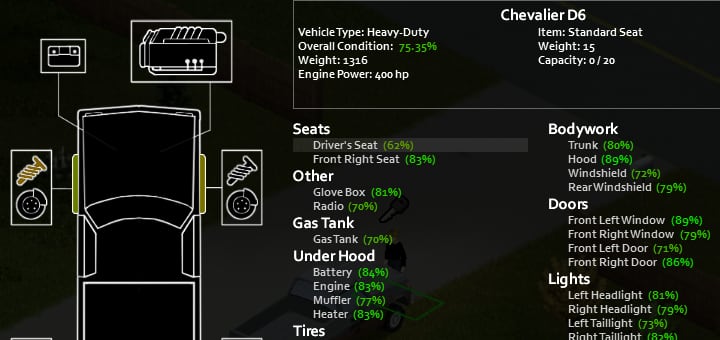
Stand at the hood and open vehicle info / mechanics. You get model, type, part list, Overall Condition, Engine Power, battery notes, and per-part condition. There is no combined “macro score” that simply adds engine power + weight + gas tank size into one rating.
Broader vehicle survival and maintenance: driving for survival · maintenance XP: maintenance skill guide.
Sandbox options that change keys and cars
| Setting (EN label) | Effect on this guide |
|---|---|
| Easy Use | Relaxes lock / key start friction for found vehicles |
| Locked Vehicle Frequency | How often discovered cars are locked |
| Vehicle Spawn Rate | How often vehicles appear on the map |
| Initial Gas | How full discovered tanks tend to be |
| General Condition | Baseline condition of discovered vehicles |
| Keys (loot) | Loot rarity for building/car keys, key rings, and locks |
| Gas Consumption | How quickly the tank drains while driving |
Related guides
Related Articles