Project Zomboid Generator Spawns & Types (Build 42.19)
Build 42.19 · power cuts · four generator models · spawn search · range & noise
1. Four generator models in Build 42.19
Build 42.19 includes four portable generators. All max condition is 100. What changes haul and base noise is weight, how often condition ticks down while running (higher “wear chance” values mean slower wear), and running sound radius. Fuel burn rate is a shared sandbox value, not a per-model perk.
 Lectromax
 Yellow / Premium
 Blue / ValuTech
 Old
Old
| In-game name | Weight | Max condition | Wear (higher = slower) | Sound radius | Practical read |
|---|---|---|---|---|---|
| Generator - Lectromax | 40 | 100 | 30 | 20 | Standard unit: mid weight and mid wear. |
| Generator - Premium Technologies | 40 | 100 | 36 | 20 | Slowest wear of the four; same noise as Lectromax. |
| Generator - ValuTech | 30 | 100 | 24 | 23 | Lightest haul; faster wear and slightly louder. |
| Generator - Old | 40 | 100 | 25 | 25 | Loudest; more common in weighted crate rolls below. |
2. Where generators actually come from
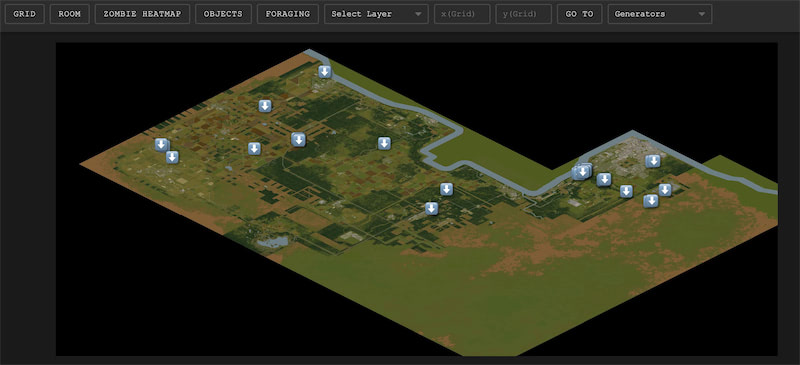
Treat “spawn spots” as building types and container rules, not a frozen pin list. Community maps and the pzfans map layer are useful for route planning, but loot rolls, sandbox rarity, and map updates all change what you find.
High-yield places to search
- Sheds, tool sheds, and backyard storage
- Residential and warehouse-style garages
- Self-storage units and industrial outbuildings
- Electronics stores (crate distributions can include generators)
- Utility / technical rooms and lockers that pull generator-room loot (tools, wiring, scrap—not a guaranteed generator in every locker)
- Some vehicle trunks have a low chance for a standard generator
Container example: electronics-store generator crates
In electronics-store cardboard boxes, the procedural crate can roll at most one generator from a junk table. Relative weights in Build 42.19:
| Item | Relative weight in crate junk |
|---|---|
| Generator (Lectromax) | 10 |
| Generator - ValuTech (Blue) | 10 |
| Generator - Premium Technologies (Yellow) | 10 |
| Generator - Old | 40 |
That means old units appear more often than yellow, blue, or standard in that specific crate—not that every electronics store stocks a premium yellow unit.
Sandbox rarity
World spawn density is adjusted by the sandbox option labeled Generators, from None through Abundant. Default Apocalypse uses Rare. Raising it increases how often units appear on the map; it does not rewrite building layouts.

Town-level planning (not fixed loot tables)
| Region focus | Reasonable plan | Do not rely on |
|---|---|---|
| Muldraugh | Dense storage, industrial edges, and residential sheds—good scavenger density for early power. | A guaranteed double yellow spawn at the trailer park—loot and world placement still depend on seed and settings. |
| Riverside | Fewer storage clusters than Muldraugh; self-storage and outlying warehouses are still worth a loop. | A fixed “~200 zombies on the road to Muldraugh” count—zombie pressure depends on day, settings, and route. |
| Rural / new B42 towns | Often quieter approaches to sheds and farm outbuildings; longer haul back with a 30–40 weight unit. | Any claim that rural pins are always safer or always stocked. |
3. Power range, basements, noise, and fuel
Once you place, fuel, connect, and start a unit outdoors, it powers devices inside a sandbox-defined bubble. Defaults on Apocalypse (and most stock presets):
| Setting | Default | Meaning |
|---|---|---|
| Generator tile range | 20 | Horizontal tiles from the generator. |
| Generator vertical power range | 3 | Floors both above and below the generator tile. |
| Generator fuel consumption | 0.1 | Base fuel burn per in-game hour (device load multiplies real drain). |
| Allow exterior generator power | On | Lets generators power exterior tiles (for example gas pumps) when enabled. |
- Basements: With default vertical range 3, a generator on the ground floor can feed floors up to three levels down. Do not assume “basements never get power.” Only multi-level bases outside that vertical window need a second unit or a different placement.
- Noise: Running sound radius is fixed per model (20 / 20 / 23 / 25). Walls, roofs, and platforms do not silence that radius. Roof placement can help access control and keep the unit outdoors; it is not a silencer.
- Indoors: Operating a generator on an indoor building tile creates toxic fumes for that structure. Run units outside.
- Fuel sources: Petrol from gas stations, vehicles, and containers. Station pumps still need power once the grid is gone—often from another generator in exterior range. See the gas station locations guide.
4. What generators actually help (and what they do not)
| Need | Build 42.19 reality |
|---|---|
| Refrigeration & freezers | Primary long-term reason to run a generator after the blackout. |
| Lights and powered appliances | Work inside the tile / vertical bubble when the unit is connected and running. |
| Gas pumps (exterior) | Possible when exterior generator power is allowed and the pump is in range. |
| Livestock “climate control” | Not a vanilla generator feature. Keep animals fed and secured; do not plan a powered barn HVAC system from stock generators. |
| Indoor crafting speed boost from “power tools” | No general vanilla rule that a connected generator multiplies crafting speed. Use power for appliances that actually require electricity. |
5. Quick scavenger checklist before the blackout
- Learn generators early (profession, magazine, or Electrical 3).
- Scout one storage / industrial loop near your intended base and note vehicle parking for the 30–40 weight haul.
- Stock Scrap Electronics and petrol before you depend on cold storage.
- Place the unit outside, connect once, start, then confirm fridges appear in Generator Info.
- Prefer yellow (Premium) when you have a choice for slower wear; take blue when you need the lighter haul; expect old units more often from weighted crates.
Step-by-step place / fuel / connect / repair flow lives in the generator usage and repair guide. For stubborn failures after you already have a unit, see Build 42 generator troubleshooting.
Related guides
Related Articles