How to Find, Use and Repair a Generator in Project Zomboid (Build 42.19)
Find · place · fuel · connect · start · repair · Build 42.19
1. Where to find generators
Generators spawn as world objects in utility and storage spaces more often than in living rooms. Good first places to check:
- Sheds, tool sheds, and backyard storage
- Garages (including residential warehouse-style garages)
- Warehouses, storage units, and industrial outbuildings
Official tip text also points at sheds, garages, and storage units. How often they spawn is controlled by the sandbox generator spawn / loot settings—not every garage has one. For map-specific lists, use the Build 42 generator spawn guide.
 Generator
 Yellow
 Blue
Blue
 Old
Old
| Variant | Weight | Sound radius | Notes |
|---|---|---|---|
| Generator | 40 | 20 | Standard portable unit |
| Generator (Yellow) | 40 | 20 | Slightly more durable wear curve |
| Generator (Blue) | 30 | 23 | Lighter, slightly louder |
| Generator (Old) | 40 | 25 | Loudest of the four |
2. How to pick up a generator
- Right-click a generator that is not connected.
- Choose Take Generator.
- The action automatically drops other heavy items, clears the conflict, and equips the generator in both hands. You do not need to empty your hands first.
Generators are two-handed heavy items (about 30–40 weight). Plan a short trip, a vehicle, or a drop path back to base. You cannot take a unit that is still connected—disconnect first.
3. Learn to operate generators
Connect and start options require generator knowledge. Build 42.19 grants it through any of these paths:
| How you learn it | What happens |
|---|---|
| Electrician occupation | Starts with generator knowledge (plus a strong Electrical XP boost). |
| Engineer occupation | Also starts with generator knowledge (not only Electrician). |
| Magazine: How to Use Generators | Reading the magazine teaches generator operation. |
| Electrical skill 3+ | Reaching Electrical 3 automatically learns generator knowledge. |
The in-game tooltip matches this: Electrician profession, learned knowledge, or Electrical 3 or higher. Level Electrical further with the Electrical skill guide if you skipped the magazine and professions.
4. Place, fuel, connect, start (correct order)
- Place outside. Put the generator on an outdoor tile within range of the rooms you care about. Prefer a spot you can fence or cover, but never put a running unit inside occupied buildings.
- Add fuel while it is off. Right-click → Add Fuel. Any inventory item whose fluid container contains Petrol works—not only Gas Cans (jerry cans, other petrol-compatible bottles/containers count when they hold petrol).
- Connect once. Choose Connect Generator. This toggles the generator’s connected state for the whole power bubble. You do not walk lamp-to-lamp to plug each light.
- Start. Turn the generator on. Requirements: connected, fuel > 0, condition > 0. If condition is 50 or lower, start has a 50% chance to fail (failed starts make noise without powering up).
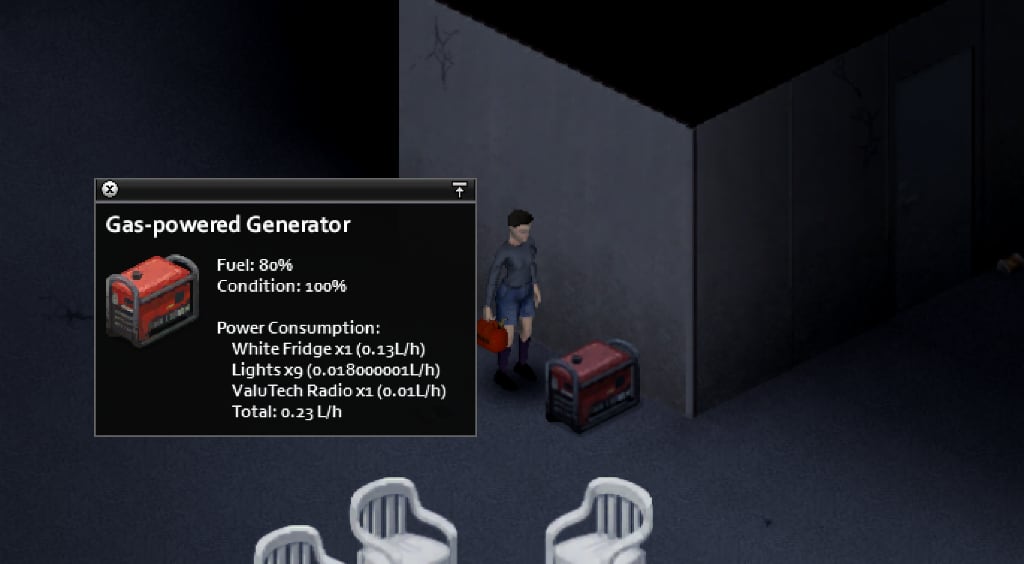
- Check Generator Info. While running, the info window lists fuel %, condition, every powered object in range, and total consumption.
5. Placement: noise, fumes, and roofs
| Topic | Build 42.19 fact | Practical takeaway |
|---|---|---|
| Indoor fumes | A generator operated on an indoor tile with a building marks toxic exhaust for that structure. | Always run generators outdoors. Leaving the building stops personal exposure; the structure stays unsafe until the unit is off. |
| Noise | Variants use sound radius 20, 20, 23, or 25 while running. | Zombies can still hear it. Roof placement does not remove the radius. |
| Roof / upstairs outdoor tiles | May help with access control and keeping the unit outside. | Useful for layout and defense, not for “silent power.” |
| Range vs. safety | Devices must sit inside the 20-tile / ±3-floor bubble. | Place just outside the wall of the room with fridges and freezers, not half a block away. |
6. Repair with Scrap Electronics
Condition drops with use. When it is worn, repair it before start failures become common.
- Turn the generator off.
- Carry at least one Scrap Electronics (dismantle radios, TVs, CD players, and other electronics).
- Right-click the generator → Fix Generator.
- Each scrap restores 4 + (Electrical level ÷ 2) condition and grants a little Electrical XP. The action repeats while condition is still under 100 and scrap remains.
| Electrical level | Condition restored per scrap |
|---|---|
| 0 | 4.0 |
| 2 | 5.0 |
| 4 | 6.0 |
| 6 | 7.0 |
| 8 | 8.0 |
| 10 | 9.0 |
There is no minimum Electrical skill to open the repair option—only scrap, an offline generator, and condition below 100. Higher Electrical still repairs faster and restores more per scrap.
7. Day-to-day checklist
- Shut off unused lights and appliances to stretch fuel.
- Stock petrol before the gas stations go dark (or power a station with another generator).
- Watch both fuel % and condition in Generator Info.
- Disconnect before moving the unit; reconnect after you place it again.
- Never leave a running generator indoors “just for a minute.”
Related guides
Related Articles