Project Zomboid B42 Towing (Build 42.19): Attach, Hitch Points, Server Flags
Vanilla attach/detach flow and multiplayer disable flags for Unstable Build 42.19. Driving tips are practical technique; reverse towing is experimental—not a reliable fix for haul feel.
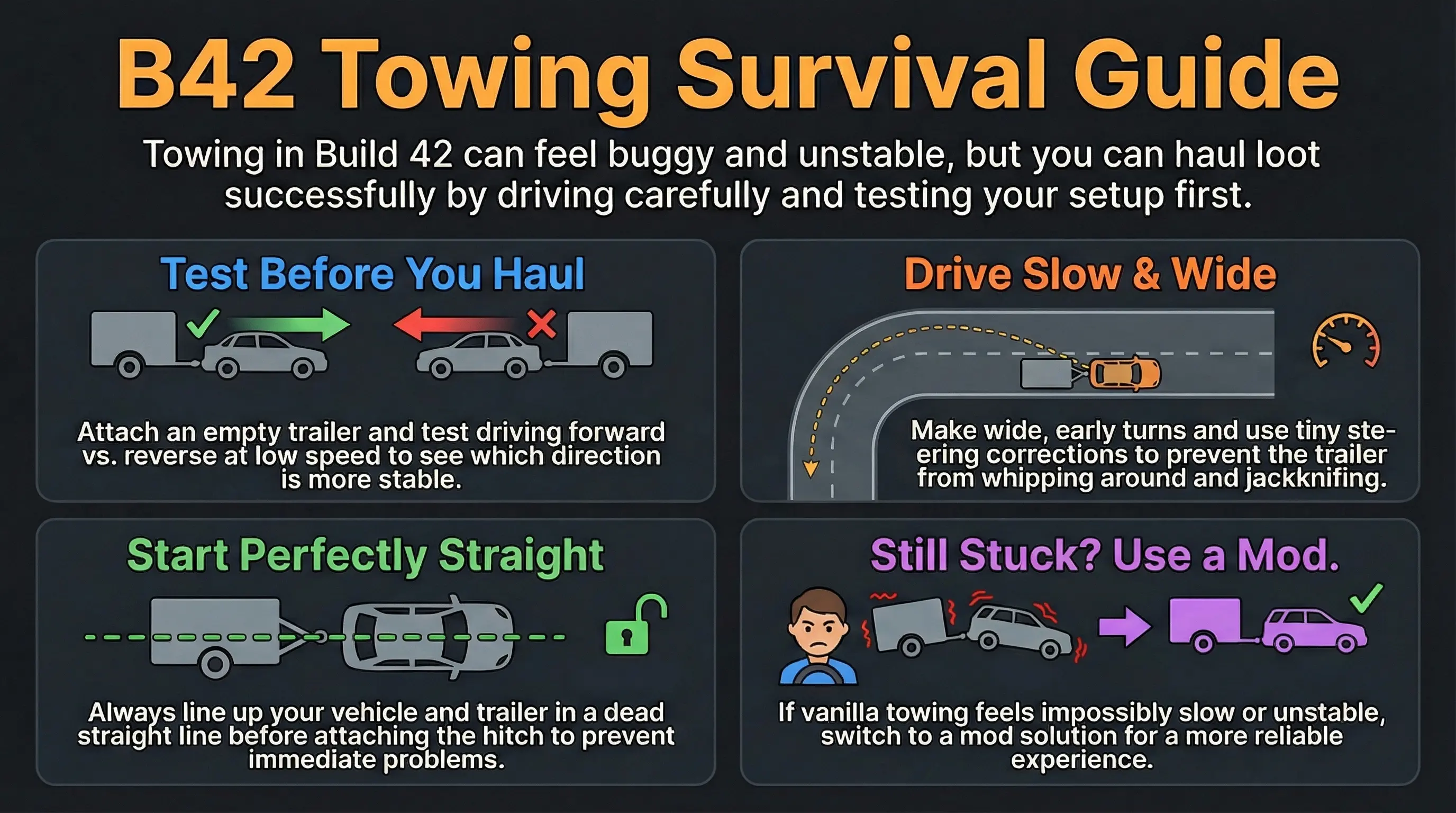
V by default), choose Attach Trailer / attach-vehicle when the pair is in range, then drive slow with wide turns. If the option never appears, check hitch orientation (rear vs front), distance (search is local), and multiplayer server flags that can disable trailer, vehicle, or burnt towing. Empty-trailer parking-lot tests beat loaded cross-town runs every time.
Quick-Start
 Pick a flat, empty lot. Wide turns and room to reset beat a crowded street.
 Align dead straight. Bumper/hitch centerline to trailer tongue; small gaps, not diagonal “almost there.”
 Use the vehicle interaction menu (radial, default
 V) near the pair. Look for Attach Trailer or an attach-vehicle label that names both vehicles and hitch sides. Start empty. Confirm attach, detach, and a short straight pull before you load generators and ovens.
 Drive boring: low speed, early wide turns, no mid-corner throttle spikes, plan stops before the trailer is angled hard.
 If the attach option is missing on multiplayer, check server options before blaming alignment (see Server flags).
How attach works in Build 42.19
Towing is a normal vehicle action, not a separate minigame. The vehicle menu decides what you can attach based on the vehicle under the cursor and what sits nearby.
| Step | What happens | Player tip |
|---|---|---|
| Open vehicle menu | Radial / vehicle UI outside or on the vehicle | Default key is often V; rebindable in options |
| Already linked? | Shows Detach if this vehicle is towing or being towed | Detach first if you need a different hitch pair |
| Find partner | Looks for a nearby vehicle on the same floor within a few tiles that can hitch with the chosen sides | If nothing appears, inch closer and re-center the hitch—not meters away |
| Walk to hitch | Your character walks to the left or right hitch handhold; fails if both sides are blocked | Clear zombies, cars, and props from both sides of the hitch |
| Attach action | A short timed attach finishes, then the pair is linked | Stay in range until the action finishes |
Hitch points: rear vs front
The menu labels hitch sides as:
- (Rear) — the usual car-to-trailer hitch end
- (Front) — nose-side hitch when the vehicle has one
Most passenger vehicles have both rear and front hitches. Utility trailers usually hitch from the rear only (typical car + trailer pair). Vehicle-to-vehicle recovery can also use front/rear combinations when both sides allow it.
| Pairing the menu tries | Typical use |
|---|---|
| Rear ↔ rear | Common car + trailer hitch |
| Front ↔ front | Nose-to-nose vehicle pairing when allowed |
| Rear ↔ front | Mixed orientation recovery |
| Front ↔ rear | Mixed orientation recovery |
Multiplayer: server can disable towing
On a client connected to a server, attach options can be turned off by three server options (names match the official EN UI strings):
| Server option | Effect when enabled | Applies when you interact with… |
|---|---|---|
DisableTrailerTowing |
Disables trailer towing | Trailers |
DisableVehicleTowing |
Disables vehicle towing | Normal (non-burnt, non-trailer) vehicles |
DisableBurntTowing |
Disables burnt vehicle towing | Burnt wrecks |
Single-player and host-local play do not apply the same multiplayer disable gate. If attach works in solo but never appears on a server, treat flags and rules as the first check—not driving skill. Admins: see server admin tips.
What changes how a haul feels
There is no single “tow difficulty” slider. Feel comes from vehicle mass, cargo weight, tires/engine condition, terrain, and speed. Treat mass and engine power as relative expectations—not a promise that a sports car will always out-tow a pickup under load.
| Vanilla trailer | Base mass | Notes (Build 42.19) |
|---|---|---|
| Utility / covered / advert trailer | 200 | Common light trailers; trunk capacity often 100 on the standard trailer trunk |
| Horsebox / livestock trailer | 500 | Heavier animal trailers; animal capacity is separate from cargo trunk |
For scale: many cars sit around mass ~800 with more engine force than trailers; pickups and vans are often heavier still. A full trailer trunk (capacity 100 on the common template) plus a light tow vehicle is a different haul than an empty utility trailer behind a strong engine. Surface (mud, snow, gravel), tire condition, and sharp throttle still dominate “glued to the pavement” complaints more than any single FAQ line.
Driving technique (still the best free upgrade)
- Straight first. Get the combination moving in a line before asking for a turn.
- Wide, early turns. Late apex + trailer angle is the jackknife recipe.
- Gentle inputs. Big steering corrections and mid-turn throttle changes feed oscillation.
- Plan stops. Brake while the trailer is still roughly aligned; hard stops when already articulated amplify slap.
- If it starts to fight you, stop, straighten, restart—don’t muscle through a parking-lot whip.
- Split loads. Two short empty-ish trips beat one overloaded disaster when the lot is tight.
Reverse towing: experimental only
If you still want to experiment for your own save:
- Use an empty trailer on a flat lot only.
- Note vehicle type, trailer type, load weight estimate, weather/surface, and speed.
- Compare a short forward pull vs reverse pull with the same inputs.
- Exit criteria: stop if the trailer jackknifes, the tow vehicle loses control, or zombies close in. Detach and switch to multiple vehicle trips or a mod setup you have tested on a backup save.
Do not plan a multi-town logistics chain around reverse towing until you have repeated the test after each game update.
Troubleshooting: settings vs operator vs feel
| Symptom | Check first | What to try (in order) |
|---|---|---|
| No Attach Trailer / attach option at all | Settings / position | Confirm multiplayer DisableTrailerTowing / DisableVehicleTowing / DisableBurntTowing → re-align hitch end (rear vs front) → move within a few tiles → clear both hitch sides → detach any existing tow link |
| Option flashes then path fails / “no way to trailer” | Access | Clear props and zombies on left and right of hitch → try the other side of the tongue → avoid cramped garage corners |
| Attaches but crawls at walking pace | Feel / load / power | Empty-trailer baseline → check tires, engine condition, fuel → lighter tow vehicle vs heavy animal trailer (mass 500) → split cargo → avoid soft terrain for the first test |
| Whips sideways on the first turn | Operator | Re-straighten before moving → lower speed → wider/earlier turns → no throttle mid-corner → unload and retest |
| Fine empty, chaotic when loaded | Load | Half loads → multiple trips → prefer open routes over downtown hairpins |
| Works in solo, never on this server | Server flags / rules | Ask admin about the three Disable*Towing options and any anti-tow mods → do not keep grinding hitch angle |
| Need to recover a wreck, not haul loot | Scenario | Vehicle-to-vehicle hitch (front/rear combos) if not disabled → clear area first → if burnt wreck, check DisableBurntTowing |
Should you tow at all this session?
- Yes, short hauls: parking lot → base, empty or light load, tested pair.
- Maybe: cross-town runs after a successful empty test on the same build and same vehicle pair.
- No / pivot: attach disabled by server, hitch never appears after correct alignment, or every turn jackknifes even empty—use multiple vehicle trips or a towing-focused mod on a backup save only.
Mods (optional pressure valve)
Physics and towing helper mods can change balance and multiplayer rules. They are not required for vanilla attach/detach. If you use them:
- Confirm Workshop status and Build 42 tags on the live page before install.
- Test on a copy of the save; note server allow-lists.
- Do not mix three vehicle-physics overhauls and then blame vanilla hitch behavior.
For general B42 mod install hygiene, see adding mods to a server and finding which mod causes errors.
FAQ
Q: Is towing “broken” in B42?
A: Attach/detach and hitch point logic are implemented and used in 42.19. Feel can still be harsh depending on mass, load, surface, and speed. Treat “broken” as a diagnosis after you rule out disable flags and alignment—not as the default assumption.
Q: Why do people say reverse towing is better?
A: Community anecdotes. This page marks reverse towing as experimental with exit criteria; it is not a documented 42.19 solution.
Q: Can I tow another car, not just a trailer?
A: Yes when vehicle towing is allowed—menus search for hitch-compatible partners, including non-trailer vehicles and burnt wrecks (each with its own disable flag on multiplayer).
Q: What key opens the attach menu?
A: The vehicle radial / interaction menu (commonly V). Check your key bindings if the radial does not open.
Related
Numbers at a glance
Hitch labels, search range, mass, and patch context
- Hitch labels: (Rear) and (Front) in the attach menu
- Partner search: same floor, within a few tiles (about ±6 squares)
- Server flags:
DisableTrailerTowing,DisableVehicleTowing,DisableBurntTowing - Trailer mass: utility / covered / advert ≈ 200; horsebox / livestock ≈ 500
- Common trailer trunk: capacity 100 on the standard trailer trunk template
Reverse-tow stability is not treated as a validated 42.19 mechanic; use it only as experimental technique with exit criteria.
Selected trailer-adjacent patch history (context only)
| Date | Note | How to use it |
|---|---|---|
| 2025-09-25 | Unstable 42.12.0 notes include base vehicle trailer visual/shader fixes | Re-test after updates; do not assume haul feel is frozen |
| 2025-03-24 | Unstable 42.6.0 includes trailer-related bug fixes (e.g. animals in trailers) | Trailer systems still churn; keep logistics flexible |
Related Articles