How to Turn Off Infection in Project Zomboid (Build 42.19)
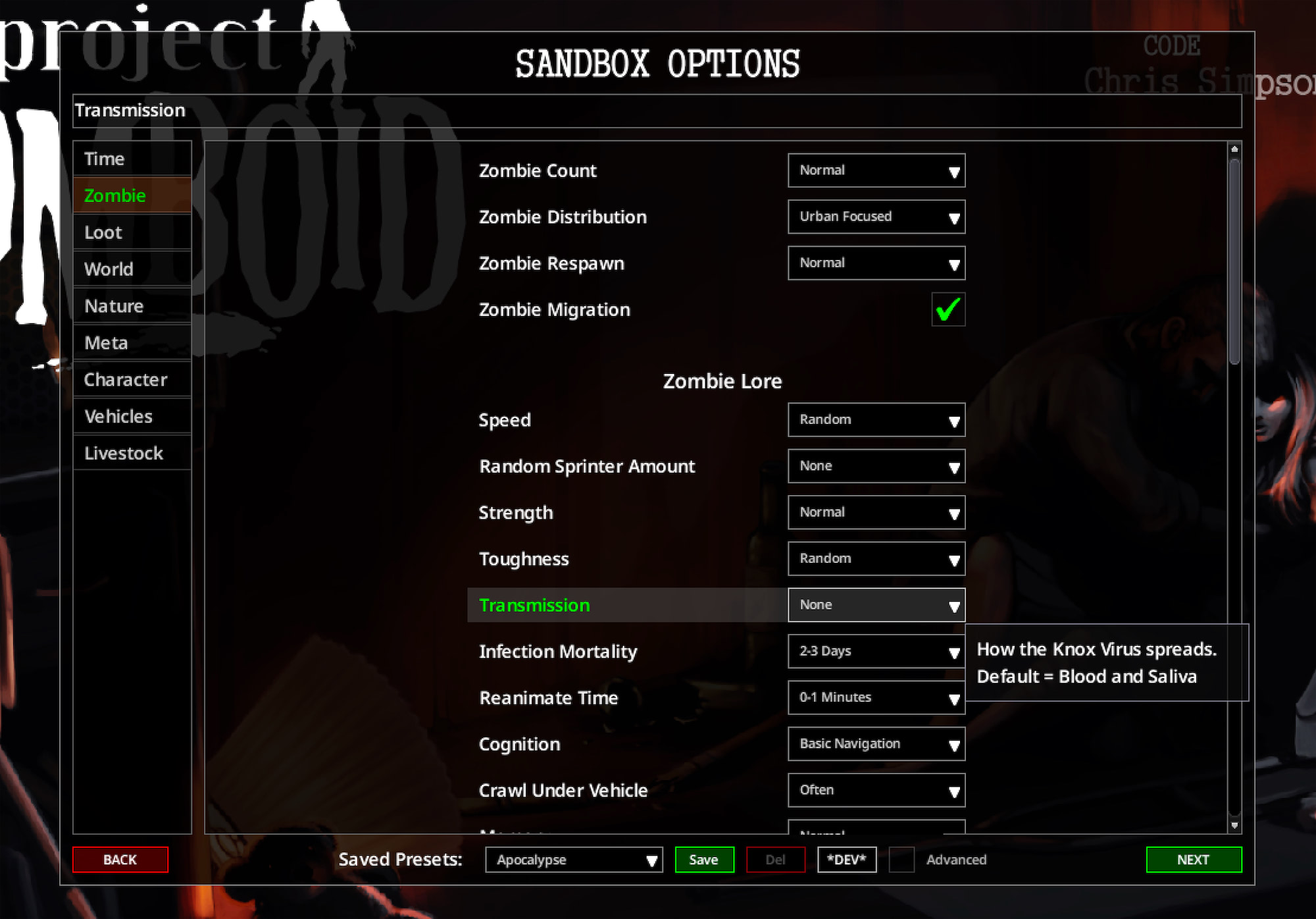
Build 42.19 · Set Zombie Lore → Transmission → None to stop new Knox infection from attacks. Infection Mortality → Never is optional for the virus death timer.
ZombieLore.Transmission = 4. Setting Infection Mortality to Never (ZombieLore.Mortality = 7) is optional: it only changes how long an already-infected character has before the virus kills them. You do not need both values just to disable spread.
What “turn off infection” means
In Project Zomboid, “infection” usually means two different systems. Sandbox Zombie Lore only controls the Knox virus (zombie plague). Ordinary wound sepsis, food sickness, and corpse-related illness are separate.
Knox virus (zombie plague)
Spread and death timer live under sandbox Zombie Lore: Transmission and Infection Mortality. There is no vanilla cure item for Knox. When Transmission allows spread, typical attack odds are roughly bite 100%, laceration ~25%, scratch ~7%—exact outcomes still depend on the hit and your settings.
Ordinary illness
Dirty wounds, rotten food, tainted water, and heavy corpse exposure can sicken you without any Knox flag. Medical care, rest, clean water, and (for septic wounds) items like Antibiotics matter here. Sandbox Transmission does not switch those off.
New world, existing world, emergency
New single-player world
Custom Sandbox → Zombie Lore → Transmission = None before you start. That is the clean path for “no new Knox from attacks.”
Multiplayer / dedicated server
Change Host sandbox UI or edit <ServerName>_SandboxVars.lua, then stop and restart the server so clients load the new values. Backup the profile first.
Already infected character
Changing Transmission stops new infections; it does not always rewrite a character already on the virus clock. Use Mortality = 7 if you want the timer never to kill, or a local debug clear for an emergency save.
Want partial risk
Keep default Transmission and use Saliva Only, longer Mortality timers, or carefully chosen mods if you still want some Knox risk without full default pressure.
Sandbox / server UI
Prefer the in-game controls when you can. They write the same sandbox values without hand-editing the server file.
Single-player custom sandbox
- Start a new game with Custom Sandbox (or open sandbox options if your flow allows editing before start).
- Open the Zombie Lore section.
- Set Transmission to None.
- Optionally set Infection Mortality to Never if you also want the virus timer never to kill.
- Start the world. Mid-save exposure of these options varies; servers use the Host UI or the sandbox file instead.
Multiplayer Host / dedicated server
- Open server settings (Host → Edit Settings / Manage Settings, or the dedicated panel’s sandbox editor).
- Find Sandbox → Zombie Lore.
- Set Transmission = None (core).
- Optionally set Infection Mortality = Never.
- Stop the server cleanly if it is running, then start it again so clients load the new sandbox values.
<ServerName>.ini and <ServerName>_SandboxVars.lua), then edit or use the UI. Do not delete world saves to “apply sandbox.”
Edit <ServerName>_SandboxVars.lua
Use this when the Host UI is unavailable (remote dedicated box, scripted deploy) or when you need to set the exact field values by hand.
Where the file lives
| Platform | Typical path |
|---|---|
| Windows | C:\Users\<Username>\Zomboid\Server\<ServerName>_SandboxVars.lua |
| macOS | ~/Zomboid/Server/<ServerName>_SandboxVars.lua |
| Linux | ~/Zomboid/Server/<ServerName>_SandboxVars.lua (or the home of the user that runs the server process) |
- The directory is
Users(with an s), notUser. - The file name is
<ServerName>_SandboxVars.lua(for exampleservertest_SandboxVars.lua). - If the server runs under a different system user or container home, use that user’s
Zomboid/Server/tree.
Safe edit steps
- Stop the multiplayer server completely.
- Copy
<ServerName>_SandboxVars.luato a backup (for example…_SandboxVars.lua.bak). - Open the file in a plain-text editor.
- Find the
ZombieLore = { … }block. - Set
Transmission = 4. Optionally setMortality = 7. - Save the file. Confirm braces and commas still look intact (a broken brace will prevent the server from loading the profile).
- Start the server again and join with a test character if you can.
-- Inside <ServerName>_SandboxVars.lua (other ZombieLore fields omitted)
ZombieLore = {
    -- ...
    Transmission = 4, -- None: no new Knox virus from zombie attacks
    Mortality = 7,    -- Never: optional; already-infected do not die from the virus timer
    -- ...
},ZombieLore block the field is Mortality — not a top-level InfectionMortality line. A stray top-level InfectionMortality = 7 will not apply.
Transmission = 4 is required to stop new spread. Keep default Mortality if you still want infection to be lethal when you use other transmission modes later. Use Mortality = 7 only when you also want “Never” on the infection death timer.
Platform paths and multiplayer-only notes in more detail: Turn off infection (Transmission = None).
Transmission and Mortality values (Build 42.19)
UI labels and file numbers for Build 42.19. Indices start at 1. The Apocalypse preset uses Transmission = 1 (Blood and Saliva) and Mortality = 5 (2–3 Days).
| UI: Transmission | File: ZombieLore.Transmission |
Effect |
|---|---|---|
| Blood and Saliva | 1 |
Default-style spread through blood and saliva routes |
| Saliva Only | 2 |
Stricter transmission path (saliva-focused) |
| Everyone's Infected | 3 |
Lore mode: everyone already carries it; death can reanimate. Not “bites are safe.” |
| None | 4 |
No new Knox virus transmission from zombie attacks |
| UI: Infection Mortality | File: ZombieLore.Mortality |
Effect |
|---|---|---|
| Instant | 1 |
Infection kills immediately |
| 0-30 Seconds | 2 |
Very short timer |
| 0-1 Minutes | 3 |
Short timer |
| 0-12 Hours | 4 |
Same-day timer |
| 2-3 Days | 5 |
Multi-day timer (Apocalypse-style default pace) |
| 1-2 Weeks | 6 |
Long timer |
| Never | 7 |
Virus timer never kills (optional; not required to disable spread) |
Wounds, food sickness, Antibiotics
Wound infection (not Knox)
- Dirty or poorly managed wounds can become septic (health-panel infected wound status).
- Antibiotics help septic wounds. In-game tooltip: Fights wound infections. Cannot prevent zombification.
- Disinfect, bandage, rest, and First Aid skill still matter. Do not treat Antibiotics as a Knox cure.
Food / environment sickness
- Rotten food, tainted water, and heavy corpse exposure can make you Queasy or worse without any zombie bite.
- Sandbox food spoil rates and hygiene habits reduce these deaths; they are unrelated to Transmission.
- Watch moodles and the health panel rather than relying on version-by-version food-poison folklore.
Debug emergency clear (already bitten)
Sandbox Transmission changes do not always rewrite a character who is already infected. For a local emergency save, debug tools can clear the Knox flag.
- Steam → Project Zomboid → Properties → Launch Options: add
-debug. - Load the save. Open the debug menu (bug icon / debug toolstrip).
- Open General → stats/body tools.
- Use the body toggles: uncheck Infected if present. You can also adjust a Zombie Infection slider when the panel exposes it.
- God Mode is a separate invulnerability-oriented toggle. Prefer the explicit Infected flag when you only need to undo Knox.
Mods
Workshop mods can add immunity, probabilistic recovery, amputation, or crafted cures. Names change and forks often lag behind Build 42, so always re-check the Workshop page for your branch before installing.
- Search Steam Workshop for current Build 42 tags and recent update notes.
- Note Workshop ID, Mod ID, load order, and whether the mod edits infection chance, mortality, or only post-infection recovery.
- Prefer sandbox Transmission = None for a clean vanilla “no Knox spread” multiplayer baseline; use mods when you want partial risk or roleplay cures.
- Common categories: immune traits, antibody systems, rare cure items, amputation kits, configurable infection thresholds, and general cheat menus.
- For amputation-focused play, see The Only Cure — re-check Workshop compatibility for your build.
Gameplay impact
With Transmission = None, players stop treating every scratch as a potential soft-lock. Combat mistakes still kill through bleeding, fractures, exhaustion, and being swarmed—only the Knox infection channel is closed.
Benefits
- Fewer forced character resets after one bad bite in co-op
- Better fit for long-term base-building servers
- Focus shifts to logistics, wounds, and swarm management
Trade-offs
- Removes the signature “you are already dead” pressure
- Combat becomes less high-stakes if players lean into risk
- Not invulnerability: ordinary wounds and food sickness remain
FAQ
Do I need Transmission = None and Mortality = Never together?
No. None alone stops new attack infection. Never only removes the virus death timer for people who are already infected (or who become infected under other modes).
Is Everyone’s Infected the soft multiplayer mode?
No. It is the “everyone carries it / death can turn you” lore mode. Soft multiplayer for bites is Transmission = None (or careful Saliva Only if you still want some risk).
Can antibiotics or Lemongrass cure Knox?
No. Antibiotics target wound infection power and explicitly cannot prevent zombification. Herbs and food recovery help ordinary sickness, not the Knox flag.
Does Transmission = None make me invincible?
No. Bleeding, fractures, exhaustion, fires, vehicles, and swarms still end runs. Only the Knox infection channel from attacks is closed.
What about an existing infected character after I change sandbox?
Transmission stops new infections. For someone already infected, use Mortality = 7 if you want the timer never to kill, or a local debug clear on a backed-up single-player save. Multiplayer admins should agree on policy before using debug tools.
Does debug ban achievements or permanently flag my save?
Treat debug as intentional cheating for your own local runs. Keep backups, and check your platform’s achievement rules if that matters to you—do not rely on community rumors either way.
Related guides
- Turn off infection (Transmission = None) — multiplayer paths and SandboxVars platforms.
- Infection modes explained — Transmission options and Knox vs ordinary illness.
- Server administrator tips — backups, sandbox, and day-to-day host tasks.
- First aid guide — wound care separate from the Knox virus.
Related Articles