Project Zomboid CD Player Not Working? Build 42 Fix
Build 42.19 · CD Player controls, media behavior, and loot priority

Quick answer
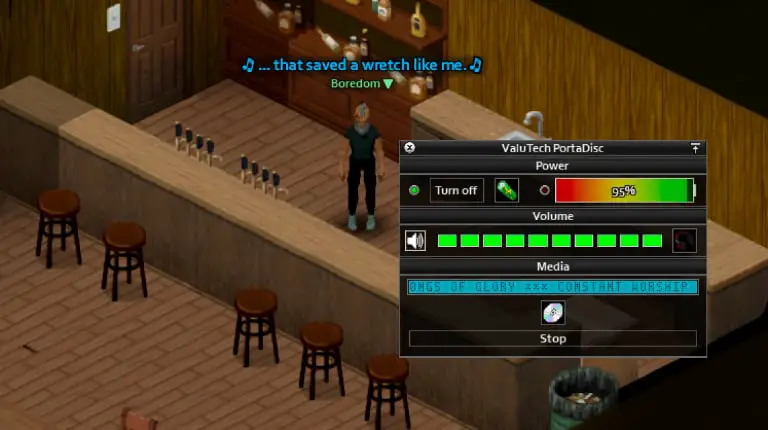
The CD Player works in Build 42.19, but playback is mostly on-screen text, not voiced songs. Equip the device or place it on the ground, insert a charged battery and a real CD, turn the power on, raise the volume above zero, and press Play.
Fix the CD Player in six steps
- Make the device operable Equip the CD Player in your primary or secondary hand, or place it on the ground. Right-click it and open Device Options.
- Insert a charged battery The power panel must show a battery and remaining charge. Replace an empty battery before continuing.
- Insert the correct media Use the inventory item named CD. VHS and Home VHS tapes will not fit.
- Turn the power on The Play action only starts when the device is turned on and contains media.
- Set volume above zero A muted device does not deliver its media text and effects to the listener. Raise the volume before pressing Play.
- Press Play and wait for the first line If the display says “PRESS 'PLAY' TO START,” the CD is loaded but idle. Press Play and allow time for the text sequence to begin.
What each symptom means
| Symptom | Likely cause | What to do |
|---|---|---|
| No Device Options entry | The portable device is inside a bag or ordinary inventory slot. | Equip it in a hand or place it on the ground, then open its context menu again. |
| The device will not turn on | No battery, an empty battery, or no remaining device power. | Insert a charged battery and confirm the power bar is above zero. |
| The display says “NO DISC” | No compatible CD is inserted. | Drag a regular CD into the media slot. Do not use a VHS item. |
| The display says “PRESS 'PLAY' TO START” | The CD is recognized but playback has not started. | Turn on the device, set volume above zero, and press Play. |
| Only clicks or static, with no voiced lyrics | The current CD system uses recorded text lines rather than voiced tracks. | Watch for text from the device or above the character. Missing voice audio alone is not evidence that the CD Player is broken. |
| Playback starts but no text appears | Volume is muted, the device lost power, the media state is stuck, or a mod is interfering. | Raise volume, replace the battery, remove and reinsert the CD, try a second CD, and test without outdated media mods. |
| An equipped player works for other characters but not this one | The character has the Deaf trait. | Portable inventory-device text is suppressed for Deaf characters, so this is not a battery or CD fault. |
What CDs actually do
CDs play as translated text lines with mood effects, not as voiced music files. Build 42.19 includes 69 CD titles, and their lines mainly reduce boredom. A character only gets the effect from a line the first time they hear it, and the system applies a short cooldown before the same kind of stat change can fire again.
Replaying already-known lines will not keep stacking the same benefit. See the complete CD and VHS list for individual titles and effects.
Where to find a CD Player
| Search priority | Where to look | Pool rolls | CD Player relative weight |
|---|---|---|---|
| High | Music-store CD shelves | 4 | Two entries: 20 and 10 |
| High | Gigamart home-electronics section | 4 | Two entries: 20 and 10 |
| Medium | Band-practice instrument storage | 4 | 10 |
| Medium | Music-school lockers | 4 | 10 |
| Medium | University therapy desks | 4 | 8 |
| Lower | Home-office desks (including classy variants) | 4 | 4 |
| Lower | Electronics crates | 4 | 4 |
| Lower | Secondary-classroom desks and some school lockers | 2 | 4 |
 These are priority places, not an exhaustive list. The CD Player also appears at lower relative weights in bedrooms, living rooms, offices, lockers, and general junk containers.
If it still does not work
- Try a fresh battery and a different CD before changing any game files.
- Stop playback, remove the CD, turn the device off, then reinsert the CD and repeat the six-step sequence.
- Test in an unmodded single-player save. Build 41 media or radio mods must be updated for Build 42.
- If the problem only occurs on one multiplayer server, compare the required client and server mod lists before reinstalling the game.
Related guides
Related Articles