How to Turn on Night Vision in Project Zomboid (Build 42.19)
Build 42.19 · no vanilla night-vision goggles · Cat's Eyes, flashlights & sandbox darkness
 Cat's Eyes
Cost 3 · better night vision
Cat's Eyes
Cost 3 · better night vision
 Flashlight
Standard hand light
Flashlight
Standard hand light
 Heavy Duty
Longer, stronger beam
Heavy Duty
Longer, stronger beam
 Angle Head
Webbing attachment
Angle Head
Webbing attachment
 Battery
Keeps lights running
Battery
Keeps lights running
1. Vanilla options at a glance
| Approach | Available in 42.19 vanilla? | How you use it |
|---|---|---|
| Lootable night-vision goggles | No | Nothing to equip or power in the base game |
| Cat's Eyes trait | Yes (character creation) | Always active at night once selected; no hotkey |
| Flashlights and similar lights | Yes | Equip (or attach), then turn on while charge remains |
| Sandbox Darkness during night | Yes (new game / sandbox) | Set the option when creating the world, or via sandbox rules |
| Debug night-vision toggle | Debug / tools only | Not a survival item path—do not expect it in normal play |
| Third-party NVG mods | Only if you install a mod | Depends on that mod; popular older Workshop pages still target Build 41 |
2. Cat's Eyes (vanilla night-vision trait)
This is the only built-in character trait aimed at night vision. In the trait list it is labeled Cat's Eyes.
Cost
3 trait points in Build 42.19 (not a shared package with Dextrous).
In-game description
“Better vision at night.” No other combat or inventory bonuses are listed on the trait.
What it does
When the world is very dark, Cat's Eyes raises how much ambient light you see—enough to move and fight more safely at night. It is not a separate toggle you press mid-game, and it is not a simple “+20% FOV” buff.
- Start a new character (or use any creation screen that still spends trait points).
- Open the positive traits list and select Cat's Eyes for 3 points.
- Play at night—no extra equip or key is required. The effect is passive.
For a broader traits overview, see the occupations and traits guide.
3. Turn on a flashlight (practical night light)
If the real question is “how do I see at night,” flashlights are the normal equipment answer. They are battery-powered lights you equip and turn on.
- Loot or craft a light: common options include the standard Flashlight, Flashlight - Heavy Duty, angle-headed variants, or an improvised crafted flashlight.
- Make sure it has charge. Insert a Battery when empty via the insert-battery recipes or context actions.
- Equip it in a hand, or attach an angle-headed light if you have webbing that supports it.
- With the light equipped or selected, use the item’s activate / turn on action (inventory right-click, or your bound activate control). You should hear the flashlight on/off sounds when it works.
- Turn it off when you do not need light—an active beam advertises you to zombies and drains charge.
| Item | Weight | Light distance | Light strength | Notes |
|---|---|---|---|---|
| Flashlight | 0.5 | 15 | 1.8 | Standard hand light |
| Flashlight - Heavy Duty | 1.0 | 25 | 2.0 | Longer cone / stronger beam |
| Flashlight - Angle Headed | 0.5 | 15 | 1.5 | Webbing attachment |
| Flashlight - Angle Headed (Army) | 0.5 | 15 | 1.5 | Webbing; slightly different drain |
| Flashlight - Improvised | 1.0 | 11 | 1.2 | Crafted option; shorter range |
| Penlight | 0.2 | 11 | 1.2 | Light weight, modest beam |
Candles are a separate low-range light path and are not night-vision gear. Vehicle headlights also help outdoors once you have a running car—still not NVG.
4. Sandbox: Darkness during night
In Custom Sandbox, look for Darkness during night. Tooltip: “The level of ambient lighting at night.”
| UI name | Typical use |
|---|---|
| Pitch Black | Hardest nights; lights matter most |
| Dark | Darker than default |
| Normal | Default on Apocalypse, Outbreak, Rising, Six Months Later |
| Bright | Easiest ambient nights (still not true NVG) |
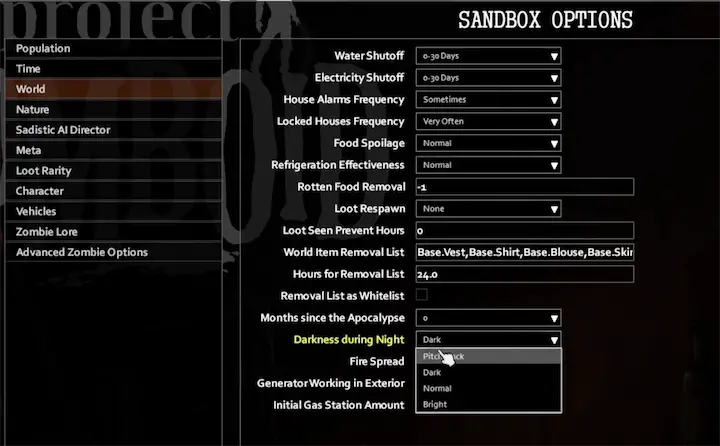
- Extinction starts on Pitch Black.
- Apocalypse / Outbreak / Rising / Six Months Later use Normal.
- Change this when creating a custom sandbox world (or via server sandbox rules). Mid-run multiplayer changes need admin/server config access.
Related: sandbox settings for beginners.
5. Workshop night-vision mods (Build 41-era; no 42.19 support confirmed)
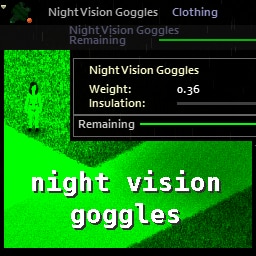
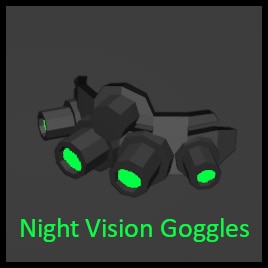
Vanilla does not ship night-vision goggles. Any NVG is third-party. These older Workshop entries last updated in 2022 still target Build 41; neither has a confirmed Build 42.19 path. If you try one, use a backup test world and check its current dependencies first.
| Workshop | Title | Last update (UTC) | Notes | Build compatibility |
|---|---|---|---|---|
| 1793461606 | eris_nightvision_goggles | 2022-01-05 | Description states B41 IWBUMS compatible NVG | Build 41-era; no confirmed 42.19 support |
| 2769995104 | Night Vision Goggles | 2022-03-10 | Tags include Build 41; page says not supported; depends on NVAPI | Build 41; author marks it unsupported |
If you still want to try a mod
- Subscribe on Steam Workshop and confirm the author’s current Build tag / last update for 42.x.
- Enable the mod (and every required dependency) in the game’s Mods list. For dedicated servers, add the same Workshop IDs server-side. See how to add mods to a server.
- Start a new save after enabling load-order critical mods when the author requires it.
- In-game, follow that mod’s own item spawn, equip slot, battery/durability, and toggle key rules—vanilla has no NVG hotkey to fall back on.
- If the item never appears or the effect never engages on 42.19, treat the mod as incompatible rather than a missing vanilla step.
6. Debug-only night vision (not for normal play)
Debug tools include a night-vision style control for testing. That path is for debugging, not for looting goggles in Apocalypse. Do not expect this control in an unmodded, non-debug survival session.
FAQ
Is there a key to turn on night vision in vanilla?
No. Vanilla has no equipable NVG and no survival hotkey for a night-vision effect. Use Cat's Eyes (passive), activate a flashlight, or change Darkness during night.
Does Cat's Eyes give +20% vision?
The old “+20%” line is an oversimplification. The in-game text is only “Better vision at night.” In practice it raises how much ambient light you see when the world is very dark—it is not a +20% range or FOV buff.
Can I unlock night vision mid-run without mods?
You cannot unlock true NVG mid-run in vanilla. You can still loot flashlights, keep batteries, use vehicle lights, and (if rules allow) adjust sandbox darkness on the server. Cat's Eyes is chosen at character creation.
Why did older guides mention Eris Minimap or Lumberjack?
Those do not turn on night vision. Minimap mods are navigation tools; Lumberjack grants Axeman plus Axe/Strength/Maintenance boosts—not night vision. They are not part of this guide’s main path.
Related Articles