How to Move and Place Furniture in Project Zomboid (Build 42.19)
Build 42.19: pick up and place furniture, common requirements, and safe base uses. Furniture is not a reliable combat barricade.
1. How to pick up furniture
- Clear the object first: empty fridges, cabinets, ovens, and other containers. Rain collectors and similar fluid objects cannot be picked up while they still hold water. Surface items sitting on the furniture must be removed as well.
- Make sure your inventory (or a worn bag with free capacity) can accept the item weight. A typical fridge is about 40 weight units; sofas, beds, and appliances are often heavy enough to force you to drop other gear first.
- Click the Move Furniture icon on the left side of the screen (crate / furniture control). This opens the moveable cursor.
- Select Pick Up mode if it is not already active. With the cursor open, default Tab cycles modes: Pick Up → Place → Rotate → Scrap → Repair.
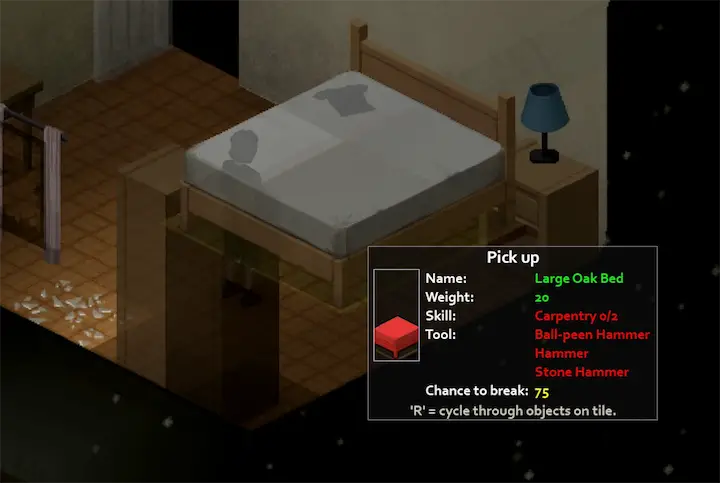
- Hover the object. The info panel shows name, weight, and any tool or skill requirement for this object. Press default R if several moveable objects share the same square and you need to cycle the target.
- Left-click when the highlight is valid. Your character walks over and performs the timed pick-up. The furniture becomes inventory items (sometimes several parts for multi-tile beds and sofas).
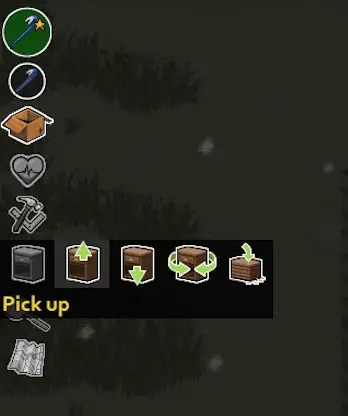
Tab and R — what they actually do
| Control (default) | Options binding | What it does |
|---|---|---|
| Left-side furniture icon | — | Starts the moveable cursor. If you cancelled with Esc or finished an action and the cursor is gone, click this again—Tab alone will not reopen Place mode. |
| Tab | Toggle mode | Cycles Pick Up / Place / Rotate / Scrap / Repair only while the moveable cursor is open. |
| R | Rotate building | In Pick Up or Scrap: cycle which object on the tile is selected. In Place or Rotate: cycle which inventory furniture item to put down, and change facing when a placement direction is active. |
2. How to place furniture
- From an open cursor: after pick-up, keep the Move Furniture cursor active and press Tab until the header shows Place.
- From inventory: right-click the furniture / moveable item and choose Place. That reopens the cursor already in Place mode—use this if Tab does nothing because the cursor was closed.
- Aim at a free tile. Hold the placement interaction as shown in the footer tip; press R to cycle which furniture item you are placing or to rotate facing.
- For multi-tile beds, sofas, and large counters, every required part must be in inventory (or already staged on the ground as the game expects). Missing a half will block placement.
3. Common requirements and Build 42.19 facts
Containers must be empty
Fridges, freezers, cabinets, and similar storage must have their inventory cleared. Objects with remaining fluid (for example rain collectors) also block pick-up until emptied.
Multi-tile furniture
Beds, large sofas, and some counters split into multiple inventory parts. Carry every part before placing, or drop the parts nearby and place again so the game can reassemble the full grid.
Fridges (common house models)
Most standard Fridge pieces do not require a pick-up tool, so the old “Electricity 3 + Screwdriver” rule is not the current default for ordinary kitchen fridges. Weight is still high (often about 40). Check the panel—do not grind Electricity solely to move a basic fridge.
Water dispensers
Office water dispensers hold about 15.0 L of clean water (bottle and dispenser). Useful for base water staging, not as an infinite tank.
| Object type (examples) | Typical pick-up notes in 42.19 |
|---|---|
| Common house fridge / freezer | Often no Electrician tool requirement; still heavy; empty first. |
| Some electric appliances (e.g. dishwashers, washers, dryers) | May list Electrician tool (Screwdriver) and an Electricity level on the panel—follow that object, not a global fridge rule. |
| Beds / large sofas | Multi-tile; need all parts; placement fails if a half is missing. |
| Water dispenser | About 15 L clean water capacity. |
| Ovens, counters, chairs | Clear surfaces and contents; watch weight and free floor space at the destination. |
4. Why move furniture (safe uses)
- Base layout: haul beds, sofas, ovens, and dispensers into a secure house so sleep, cooking, and storage sit where you want them.
- Loot sorting: pull cabinets and shelves into a central warehouse room instead of running the same hallway every trip.
- Clearing work space: remove clutter so you can build walls, stairs, or farming plots without fighting tile occupancy.
5. FAQs
Can I move fridges in Project Zomboid?
Yes. Empty the fridge first and free enough carry weight. For common house fridges in Build 42.19, do not assume Electricity 3 and a screwdriver are required—read the moveable info panel on the exact fridge. Some other appliances do require electrician tools; fridges usually do not share that requirement.
Why can’t I place a bed, couch, or fridge?
Usual causes: the Place cursor is not open (click the left icon or inventory Place); a multi-tile object is missing a part; the destination tile is blocked; you are still in Pick Up mode; or inventory weight / free hands are wrong for the placement action. Cycle with R if the wrong inventory piece is selected.
Tab does nothing when I try to place
Tab only toggles modes while the moveable cursor is already running. If the cursor closed after pick-up, reopen it from the left-side icon or right-click the item → Place.
Is R the place key?
No. R cycles the selected object or inventory furniture piece and rotates facing during placement. Actual placement uses the Place mode click / hold interaction shown in the cursor footer.
How much water does a water dispenser hold?
In Build 42.19, the dispenser holds about 15.0 L of clean water—not 250 units from older write-ups.
Related guides
Related Articles