How Fog Affects Zombie Vision in Project Zomboid (Build 42.19)
Build 42.19. In the formulas below, fog intensity runs from 0 (clear) to 1 (full fog).
Fog at a glance
Vision
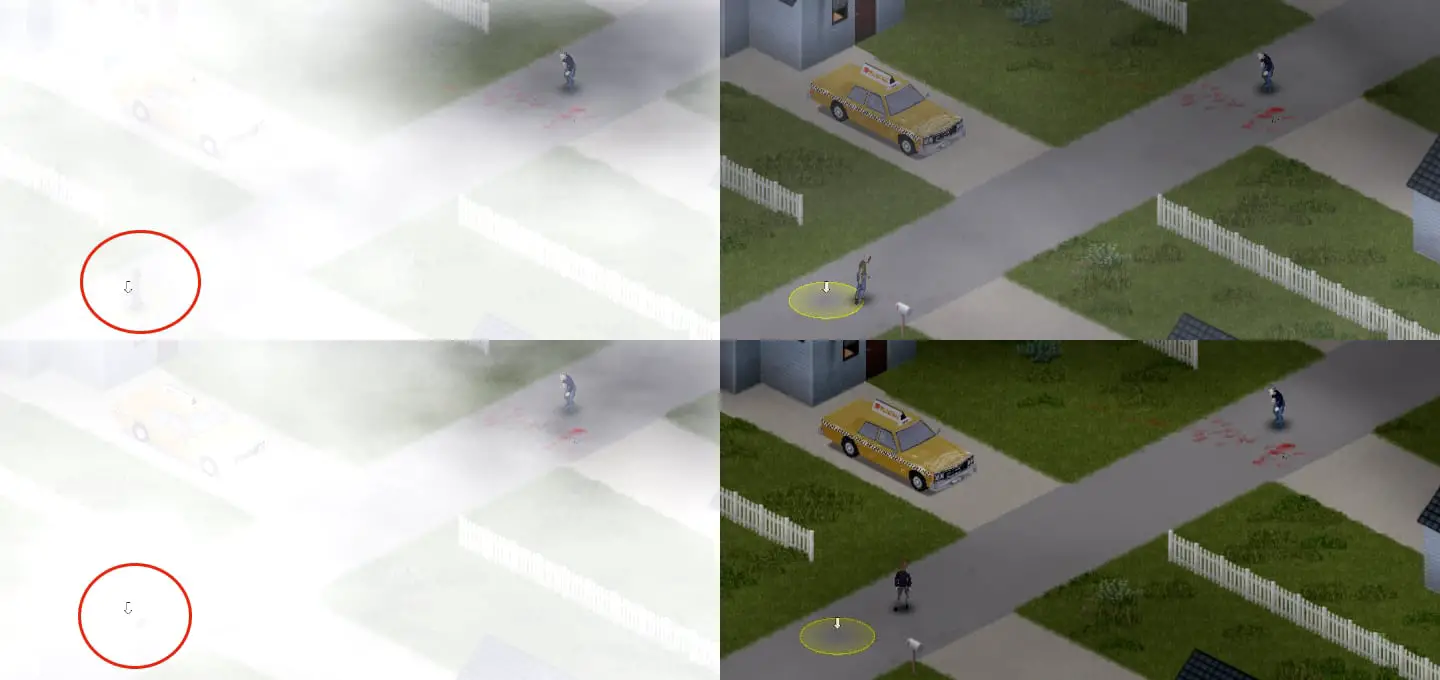
Fog penalty = fog intensity × 7. Combined with rain and darkness, it reduces zombie vision radius from a 20 base toward the 10 floor.
Hearing
Weather hearing multiplier = 1 − rain×0.33 − fog×0.10. Full fog alone cuts hearing range by about 10%.
Clearing fog
No item or light clears world fog. Use Fog Cycle → No Fog for new worlds, or admin Climate Fog override at 0.
How fog changes zombie vision
Each tick, zombies recompute a weather-adjusted vision radius. Rain intensity is scaled by 2.5, fog intensity by 7, and darkness uses a separate light/daylight penalty (up to ×5). Those penalties feed one formula:
In practice, strong fog is one of the largest sight penalties in the weather stack. Zombies still see—especially at short range—but their effective radius drops as fog thickens. Sight traits (Eagle-Eyed / Poor Sight / Random sandbox options) and worn-item vision modifiers apply after the weather step; eating a corpse also halves vision while that state lasts.
How fog changes zombie hearing
Weather multiplies zombie hearing. The shared weather hearing multiplier is:
That value stacks on top of base hearing traits and worn-item hearing modifiers. At full fog with no rain, hearing is about 0.90 of normal—a small reduction, not zero impact. Rain is the larger weather hearing cut (up to about one-third at full rain). Older guides that claim “zombie hearing is unaffected by fog” are wrong for Build 42.19.
| Weather | Intensity | Vision effect (before sight traits) | Hearing multiplier (weather only) |
|---|---|---|---|
| Clear | Fog 0, rain 0 | No fog/rain penalty; darkness may still apply | 1.00 |
| Moderate fog | Fog 0.5 | ~3.5 subtracted via fog term (plus any rain/darkness) | 0.95 |
| Full fog | Fog 1.0 | ~7 subtracted via fog term; radius tends toward the 10 floor when combined with other penalties | 0.90 |
| Full fog + full rain | Fog 1.0, rain 1.0 | ~7 + 2.5 weather terms stacked against the 20 base | 0.57 |
Other fog effects on you
- Player visibility: thick fog reduces how far you can see, which matters for driving, aiming, and spotting hordes early.
- Foraging: outdoor search power takes a weather penalty that uses fog intensity (combined with rain, snow, and clouds).
- Driving: slow down. Cruise control / low steady speed helps you stay on the road when you cannot see far. Fog itself is not reduced by headlights or other lights.
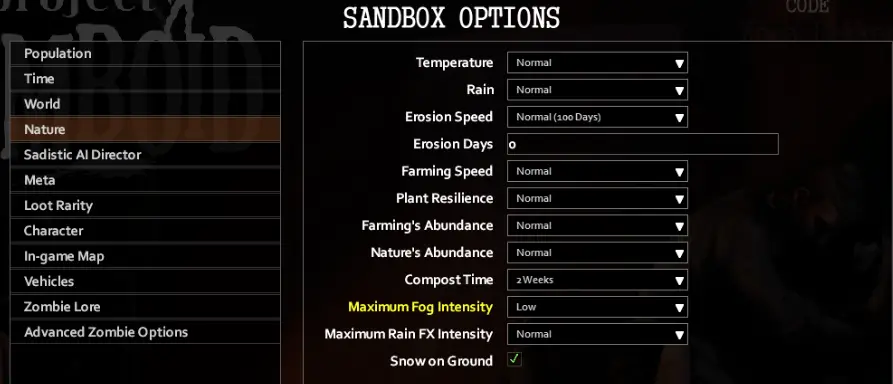
How to make fog go away
1. Normal gameplay (no admin tools)
There is no craftable item, vehicle light, or player action that clears map-wide fog. Wait for the weather to change. Plan short outdoor trips, stay closer to cover, and expect both vision and hearing to improve when intensity drops.
2. Sandbox: turn natural fog off or down
When creating or editing a sandbox world / server preset, two different options control fog:
| Sandbox option | What it does | Useful values (Build 42.19) |
|---|---|---|
| Fog Cycle | Whether fog occurs as weather at all | Normal (default), No Fog (never), Endless Fog (always cycling fog) |
| Maximum Fog Intensity | Caps how strong natural fog peaks can be | Normal, Moderate, Low, None |
- Want zero natural fog? Set Fog Cycle → No Fog.
- Want fog weather but milder peaks? Keep Fog Cycle on Normal and lower Maximum Fog Intensity.
- Apocalypse defaults use Fog Cycle = Normal and Max Fog Intensity = Normal.
3. Server / admin Climate override
Administrators can force current fog from the Admin climate controls:
- Open the Admin panel Climate section.
- Enable the Fog override tick box.
- Set the Fog slider to 0 for clear air (range is 0–1).
- Leave the override enabled while you want that forced value; disable the tick box to return control to natural weather.
This is the only reliable “make fog go away right now” path, and it requires admin rights. For general admin tools, see Project Zomboid admin commands.
Practical tips in fog
- Expect shorter zombie sight, not safety. Use fog to reposition, not to stand in the open.
- Sound still matters. Hearing is only mildly reduced by fog; guns, vehicles, and breaking glass still draw attention.
- Drive slower. Low, steady speed is a visibility tip for you—the vehicle does not disperse fog.
- Forage later if you can. Outdoor search is weaker while fog (and rain/snow/clouds) is high.
- Sandbox tuning: use No Fog for clearer PvE, Endless Fog for atmosphere runs, or lower Max Fog Intensity for a middle ground.
Related guides
Related Articles